
Enforcing KYC-Tiered Transfer Limits with BLOCK Rules
Per-KYC-level transfer limits move out of scattered constants into BLOCK rules, so every blocked transfer carries its reason.
The problem
Most money-movement teams enforce transfer limits that depend on identity verification. An account that has not completed verification can move a little. A verified account can move more. An account under enhanced due diligence can move the most. The limits themselves are policy — compliance sets them, reviews them, and changes them on compliance's schedule, not engineering's.
In code, each limit is a constant and the check is a branch in the transfer service. Then the check gets copied. The mobile team duplicates the numbers for client-side pre-validation, so users see the error before submitting. A partner API ships a year later with the values that were current that quarter. The same limit now exists in three places, and a compliance change has to land in all three at once.
It does not. A review finds an account at the lowest verification level that moved $4,800 in a single transfer — one path was checking a stale constant. Two questions land on the payments team, and no branch in the transfer service answers either. Support asks: why was this customer's transfer blocked? Compliance asks: which limit was in force on May 14, and show every transfer it stopped.
The question this pattern answers: how does a team keep exactly one limit per verification level in force across every transfer path, and answer months later which transfer was blocked, by which limit, and why.
The naive approach
The first version puts the limits next to the check, as constants in the transfer service.
public class TransferService {

    // Per-KYC limits — owned by compliance.
    private static final BigDecimal UNVERIFIED_LIMIT = new BigDecimal("1000");
    private static final BigDecimal VERIFIED_LIMIT   = new BigDecimal("10000");
    private static final BigDecimal ENHANCED_LIMIT   = new BigDecimal("50000");
    // The mobile BFF keeps its own copy of these numbers for client-side
    // pre-validation. The partner API was added later, with the values
    // that were current at the time.

    public void execute(TransferRequest request, Account account) {
        BigDecimal amount = request.getAmount();

        switch (account.getKycLevel()) {
            case UNVERIFIED -> require(amount, UNVERIFIED_LIMIT);
            case VERIFIED   -> require(amount, VERIFIED_LIMIT);
            case ENHANCED   -> require(amount, ENHANCED_LIMIT);
            // No default branch. A KYC level this switch does not know
            // falls through, and the transfer proceeds unchecked.
        }

        ledger.post(request);
    }

    private void require(BigDecimal amount, BigDecimal limit) {
        if (amount.compareTo(limit) > 0) {
            throw new TransferLimitExceededException("Transfer limit exceeded");
        }
    }
}
It works at small scale, and each copy of it was correct the day it shipped. The defect is not the arithmetic. It is where the limits live, and it surfaces three ways.
- The limit lives in more than one place. The service has it, the mobile BFF has it for pre-validation, the partner API has it from the quarter it launched. A compliance change is now a synchronized deploy across three codebases, and a miss is silent — nothing fails, one path is merely wrong.
- Changing a limit is a release. Compliance sets effective dates; constants ship on release trains. The limit a customer experiences depends on which deploy went out, and the history of the limit is the git history of three repositories.
- A block leaves no queryable record. The exception message lands in a log line. "Every transfer the UNVERIFIED limit stopped in May" is a log-archaeology project, and "the limit in force on May 14" is
git blameacross three repos.
Defining the pattern
The fix is to make the limit decision a single call. Every transfer path — the service, the mobile pre-validation, the partner API — asks the same policy group, and the limits exist exactly once.
Three LexQ concepts carry a transfer limit.
- Fact: the account's verification level and the amount it is trying to move.
kycLevel,transferAmountUsd. - Rule: one rule per verification level — a condition and a
BLOCKaction carrying areasonstring. - The default is allow. A
BLOCKaction runs only when its rule matches. A transfer that matches no rule proceeds. Every blocked transfer, by contrast, leaves behind the rule and the reason that stopped it.
The limit rules need no mutex group. An account has exactly one verification level, so the conditions partition the input — at most one limit rule can match a given transfer. Nothing competes. Where rules do compete for one decision, a mutex group picks the winner and records what happened to the rest; resolving VIP tier discount stacking covers that mechanism on its own.
{
  "name": "Block: UNVERIFIED over 1,000",
  "condition": {
    "type": "GROUP",
    "operator": "AND",
    "children": [
      {
        "type": "SINGLE",
        "field": "kycLevel",
        "operator": "EQUALS",
        "value": "UNVERIFIED",
        "valueType": "STRING"
      },
      {
        "type": "SINGLE",
        "field": "transferAmountUsd",
        "operator": "GREATER_THAN",
        "value": 1000,
        "valueType": "NUMBER"
      }
    ]
  },
  "actions": [
    {
      "type": "BLOCK",
      "parameters": {
        "reason": "transferAmountUsd exceeds UNVERIFIED limit 1000"
      }
    }
  ],
  "isEnabled": true
}
The VERIFIED and ENHANCED rules are identical in shape, each with its own threshold. A fourth rule earns its place by handling input the first three do not recognize.
{
  "name": "Block: unknown KYC level (fail closed)",
  "condition": {
    "type": "GROUP",
    "operator": "AND",
    "children": [
      {
        "type": "SINGLE",
        "field": "kycLevel",
        "operator": "NOT_IN",
        "value": ["UNVERIFIED", "VERIFIED", "ENHANCED"],
        "valueType": "LIST_STRING"
      }
    ]
  },
  "actions": [
    {
      "type": "BLOCK",
      "parameters": {
        "reason": "kycLevel outside known levels"
      }
    }
  ],
  "isEnabled": true
}
Default-allow is what lets an under-limit transfer pass without a rule for it — and the same default turns an unrecognized kycLevel into a silent pass. This rule converts that accident into a decision: an unknown level blocks, with a reason. The naive switch made the opposite choice without anyone making it.
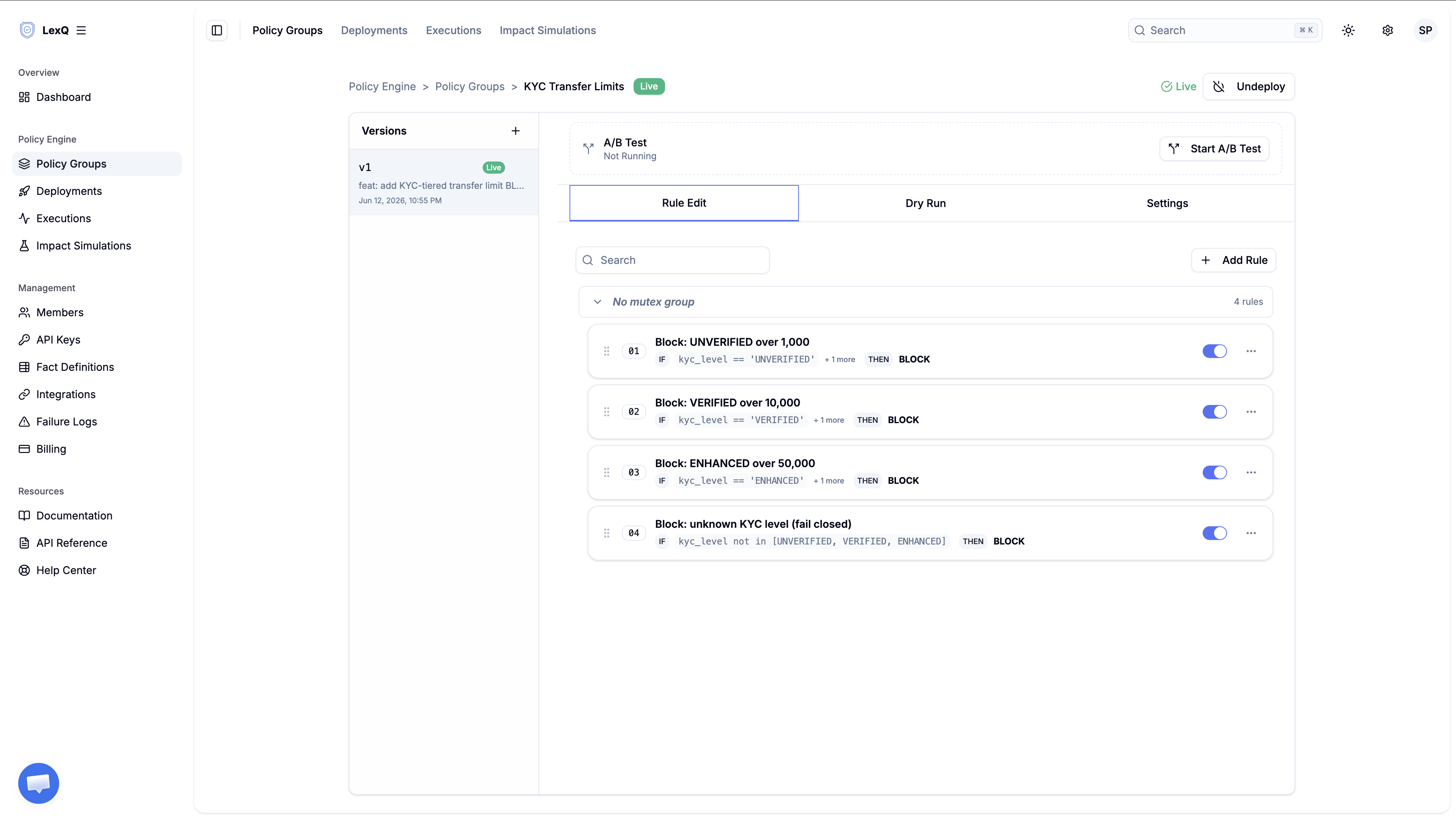
The limit is now data. Changing it means editing one value in a draft version, and version history answers "what was the limit on May 14" without anyone opening the repository.
Impact Simulation strategy
Compliance lowers the VERIFIED limit from $10,000 to $5,000. Before that value reaches a live transfer, the change has a measurable blast radius: the share of real transfers the new limit would have stopped. Cloning the live version and changing 10,000 to 5,000 produces the candidate — the Target Version, in the console's terms — and it carries no transfers yet. Testing a rule change before deploy works through that comparison as a pattern of its own; here it answers a narrower question.
This question is count-shaped, not sum-shaped, so the run needs no metric fact at all — the field is optional. includeRuleStats is enough: it reports each rule's match rate, and the VERIFIED rule's match rate under the candidate is exactly the share of last month's transfers the new limit would have blocked. That number is the support-ticket volume and the customer friction, measured before deploy.
lexq analytics simulation start --json '{
  "policyVersionId": "<candidate-version-id>",
  "dataset": {
    "type": "HISTORICAL",
    "source": "EXECUTION_LOGS",
    "from": "2026-05-01",
    "to": "2026-05-31"
  },
  "options": {
    "baselinePolicyVersionId": "<baseline-version-id>",
    "includeRuleStats": true,
    "maxRecords": 50000
  }
}'
Two readings of the rule statistics decide whether the lower limit ships. First, the newly blocked share — the VERIFIED rule's match rate under the candidate minus the baseline's — must sit inside the range operations agreed to absorb. Second, the other levels' match rates must not move at all; the edit claimed to touch one threshold, and the rule statistics verify that claim. The simulation reads May's logged transfers and writes nothing back; no money moves during the run.
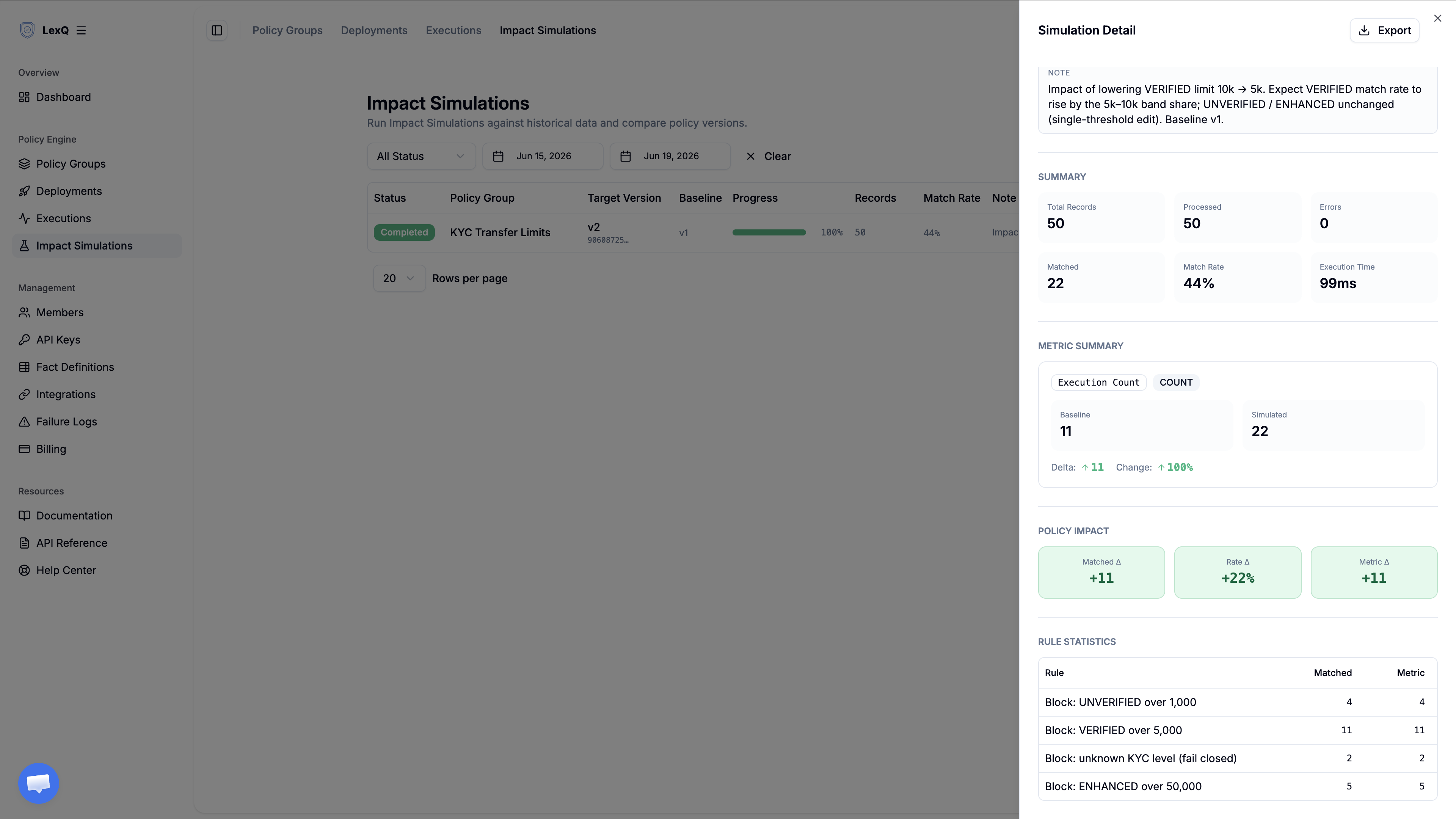
If no production traffic exists yet, upload a representative dataset instead — transfers spanning every level, with amounts clustered around each threshold — and run the same comparison.
Decision Trace output
Run the case from the compliance review: a $4,800 transfer from an UNVERIFIED account, with Dry Run.
{
  "result": "SUCCESS",
  "data": {
    "inputFacts": {
      "kycLevel": "UNVERIFIED",
      "transferAmountUsd": 4800.00
    },
    "mutatedFacts": {},
    "generatedVariables": {
      "isBlocked": true,
      "blockReason": "transferAmountUsd exceeds UNVERIFIED limit 1000"
    },
    "executionTraces": [ ... ],
    "decisionTraces": [
      {
        "ruleName": "Block: UNVERIFIED over 1,000",
        "status": "SELECTED",
        "reasonCode": "FINAL_WINNER",
        "reasonDetail": null
      },
      {
        "ruleName": "Block: VERIFIED over 10,000",
        "status": "NO_MATCH",
        "reasonCode": "CONDITION_MISMATCH",
        "reasonDetail": null
      },
      {
        "ruleName": "Block: ENHANCED over 50,000",
        "status": "NO_MATCH",
        "reasonCode": "CONDITION_MISMATCH",
        "reasonDetail": null
      },
      {
        "ruleName": "Block: unknown KYC level (fail closed)",
        "status": "NO_MATCH",
        "reasonCode": "CONDITION_MISMATCH",
        "reasonDetail": null
      }
    ]
  }
}
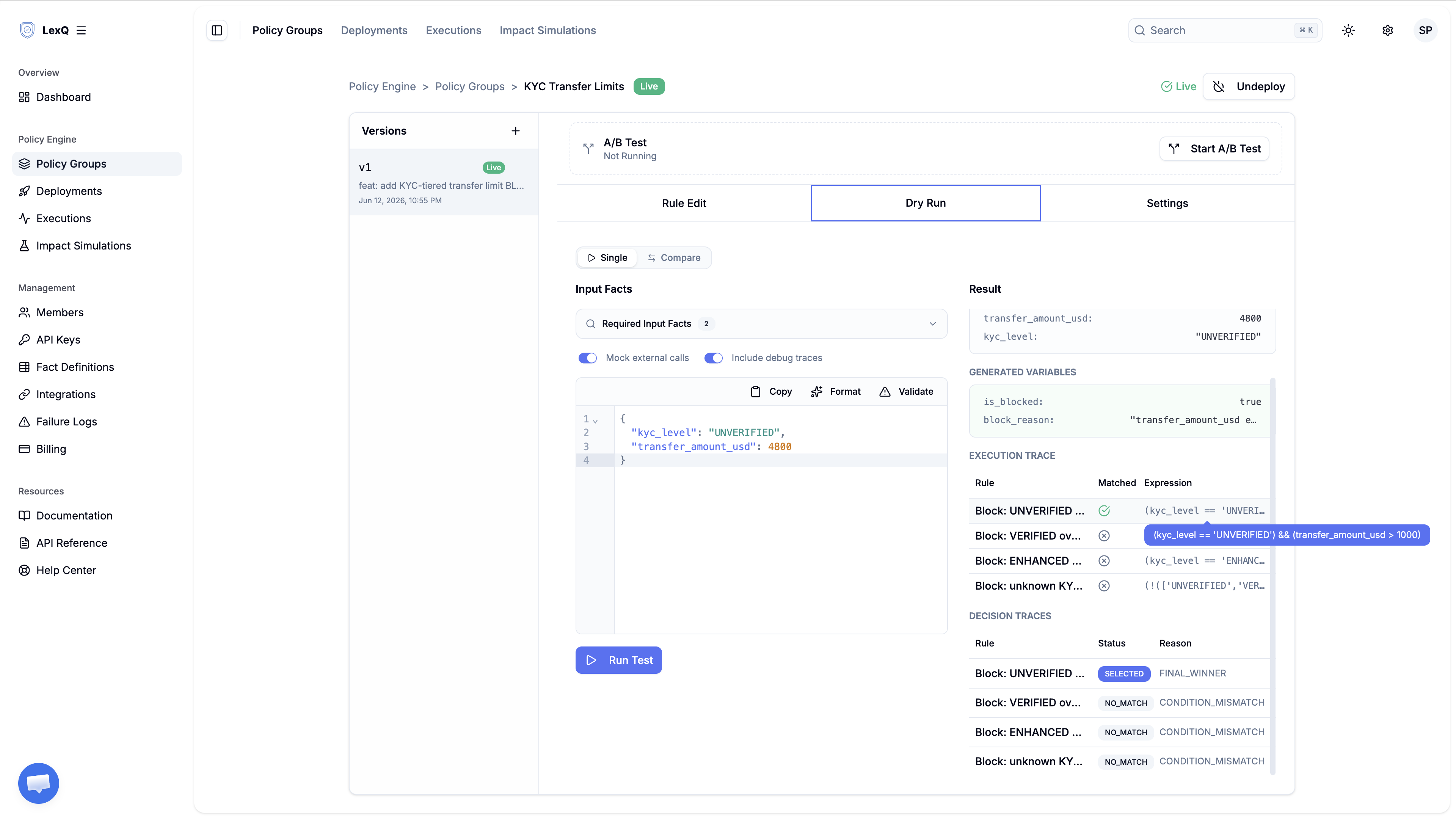
mutatedFacts is empty — a BLOCK changes no fact. What the block produces is the pair in generatedVariables: isBlocked set to true, and blockReason holding the reason string from the rule that fired. The engine writes those two keys only on a run where a BLOCK action executed, so an approved transfer has no isBlocked key at all rather than one set to false. The transfer service reads it that way: refuse the transfer when isBlocked is present and true, and return blockReason, or a customer-facing message mapped from it. The Execution Trace table in the Dry Run view above records the comparison itself: 4,800 read against the UNVERIFIED threshold. Support gets its answer from the reason string; compliance gets its answer from the trace, which names the rule, the version, the inputs, and the timestamp.
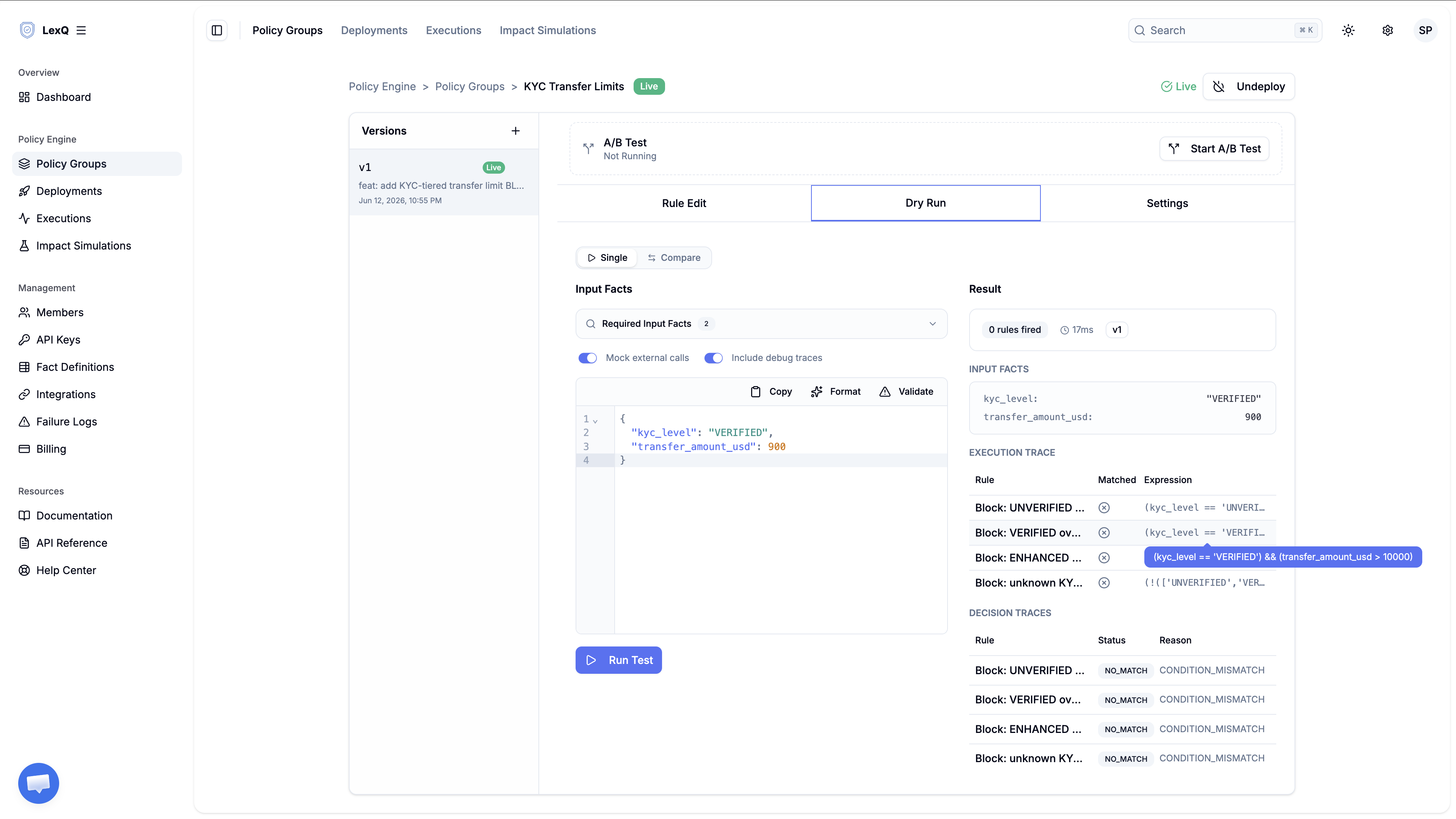
Run a $900 transfer from a VERIFIED account: no condition holds, so every rule returns NO_MATCH with CONDITION_MISMATCH. Neither map carries anything, and nothing in the response tells the caller to stop. The absence of isBlocked is the approval.
Edge cases
The pattern is the single enforcement point, not the specific limits. The cases below sit at the edges of that enforcement point, and each one needs a call made in advance rather than discovered in production.
- A transfer exactly at the limit.
GREATER_THANlets a $1,000.00 transfer pass at UNVERIFIED — "limit" read as the highest allowed amount. If the policy reads "blocks at and above," the operator isGREATER_THAN_OR_EQUAL. Decide once, write it into the rule, and the recorded match expression shows which reading is live. - An unknown verification level. An app release starts sending
kycLevelasPENDING. Without the catch-all, that transfer matches nothing and proceeds — fail open by accident. TheNOT_INrule turns the same input into a recorded block. Fail closed is itself a policy decision; the rule makes it visible instead of implied. - A missing fact. A payload without
kycLeveldoes not pass quietly. The engine raises an error naming the fact it did not receive, and it substitutes no default for it. An errored execution is not an approval, and the transfer service has to treat it as one: no level read means no limit checked, and that is the one state a money-movement path cannot ship as a pass. - Cumulative limits. This pattern bounds a single transaction. A daily or rolling total is a different problem: the engine judges one request against the facts it is handed and keeps no state between executions, so the running total has to arrive as an input fact, maintained on your side along with its time window. Different pattern, different failure modes — outside this one's scope.
- Multiple currencies. The rules compare one numeric fact in one unit. Convert upstream and send one currency; the
Usdon the end of the fact key is that contract made visible. A fact that mixes currencies makes every comparison meaningless.
Production rollout
When both readings hold, the $5,000 limit goes to production with Deploy. The four rules freeze into a snapshot at that moment, hashed and integrity-verified, and the deployment record carries the version, the person who shipped it, and the time.
The lower limit goes to every transfer at once. A gradual traffic split is the wrong instrument here: an A/B test would send some transfers to the $5,000 version and the rest to the $10,000 one, so two accounts at the same verification level, moving the same amount on the same day, would get opposite answers. A discount can tolerate that. A compliance limit cannot, because a limit that binds one transfer and not the next has stopped being a limit. Confidence to ship comes from the Impact Simulation rather than from a canary. Deploy adds the live reading: each rule's block rate on production traffic, held against the match rates the simulation predicted.
Two signals from live traffic call for an immediate rollback:
- The VERIFIED rule stops live transfers at a rate that departs from its simulated match rate. This month's transfers do not look like May's, so the blast radius operations signed off on no longer describes them.
- Blocks appear in levels the simulation reported untouched. The
kycLevelfact arriving in production does not look like the dataset.
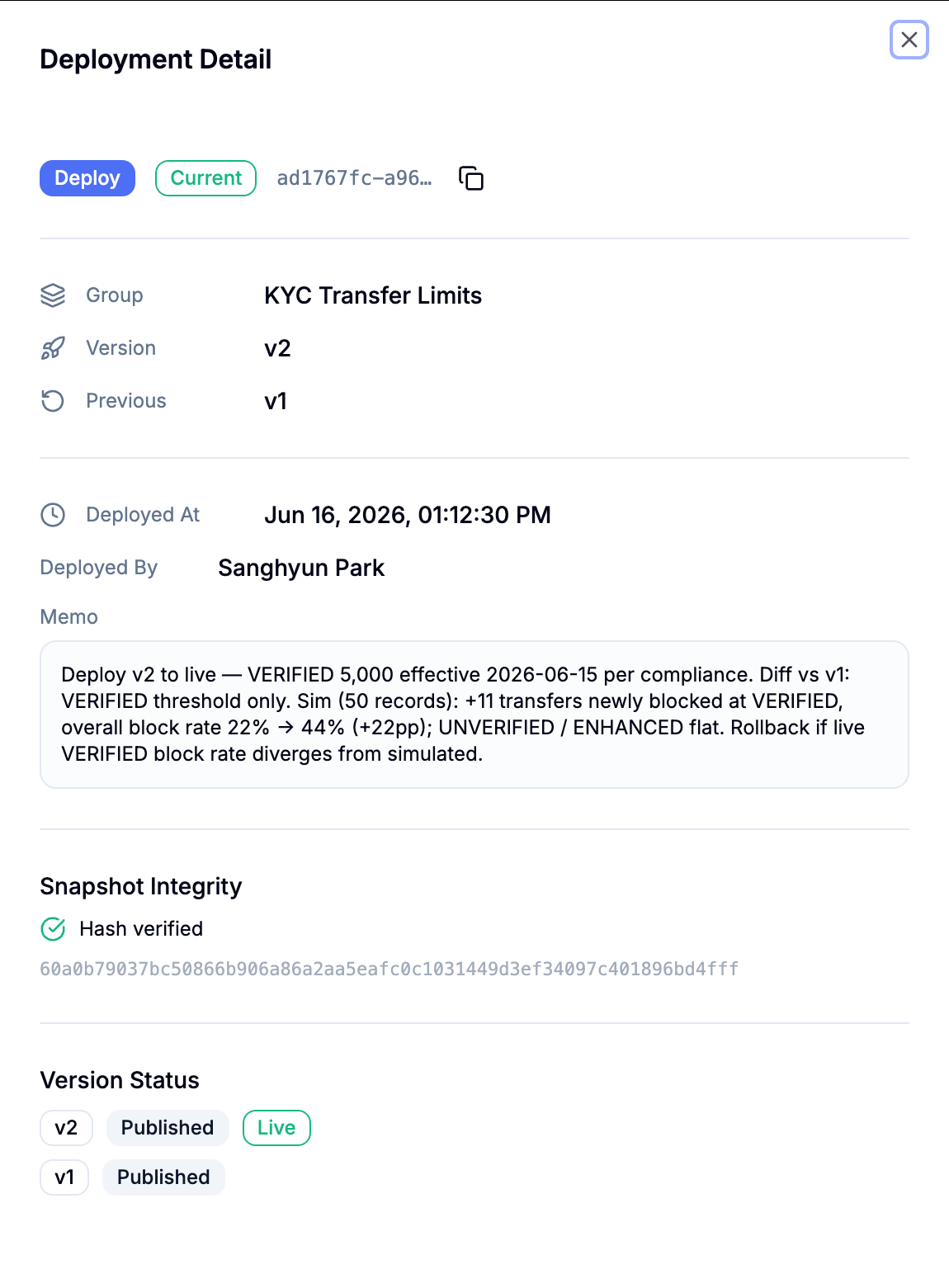
A rollback puts the $10,000 limit back in force and leaves a deployment record of its own, so the reversal sits in the audit trail beside the change it undoes. With the new version carrying every transfer, compliance's original question stops being a research task: how many transfers each level stopped in May is a filter on execution history by rule and by version, and which limit was in force on May 14 is the version history read against the deployment record. If a transfer decision takes longer after the deploy, the question narrows to which of the four rules spent the milliseconds. Isolating a slow rule on a hot path shows how to read the per-rule profile.
See how LexQ works for yourself in the playground.
Ready to move decisions out of your deploy pipeline?
Try LexQ free — no credit card required.
Start Free